Showing posts with label Blogging Tips. Show all posts

Thursday, September 13, 2012

Why Moms Blog: San’s story

The Lingering Thought - The Genesis of SANses

All endeavors start out simply. With a thought, a dream, a vision - that simply refuses to go away. My blog started out with a lingering thought as well. I felt I had something I wanted to say, and wanted to have an outlet to express my point of view. Were the blogs out there representative of MY point of view? I didn't think so, not all, and in particularly not some. Is my blog representative of your point of view? I have no illusions that they are, but the point is to provide an alternative perspective, a different point of view, and hopefully a refreshing tone of voice.

The Quick End

I was excited when I started out on the blog... And a week later, I start losing steam. And turned my attention on other interesting things.

The Fresh (Re)Start

I was pregnant with Jayvon when the thought of blogging came to my mind. It was a sermon I heard in church, believe it or not, that finally gave me the impetus to re-start the blogging engine (and this time for good!) My Pastor shared about being the "salt and light" and being an influencer. And I figured, having a blog would be a good way to bring my point of view across. To share about my difficult experiences as a young mother, my spiritual experiences as a believer, my learning experiences (and boy oh boy, is motherhood one steep learning curve!), my fun experiences with the hubby and the boys, and my victorious experiences (Ooh! Toilet trained! Weaned off the breast! Sleeping through the night! Cheers all around!)

It was during this time that I also took the leap of faith and put my money where my mouth was. By plonking down good money for my domain name! Okay it wasn't a very large plonk, but still... It was a show of commitment.

Why SANses.com? Well, two reasons. My IT-savvy colleague convinced me a domain name which has too many syllables would be too much a mouthful. So that threw randomramblings.com out the window. I didn't fancy having my name as the domain and it wasn’t clear enough, so Sandra.com was out too. I needed a simple domain name, and one that is broad enough for me to blog on a variety of topics close to my heart. SANses, is a play on the word senses (what? You mean you didn't get that?) and with it, I also aim to show snippets of my loves and my life, and also to engage your senses. Or so I hope. With (hopefully) readable writing and nice photos.

My Motivators

I guess it is plain to see why and how SANses started. The key is really why I am STILL blogging. This is my reason. Times two.

steph-tan-sandra-0005 Photo credit: Steph Tan Photography

Capturing memories together.

More than just jotting down the mundane of where we went and which new playground we thrashed visited, or what touristy thing we did, I hope to also capture the fun moments, the endearing times, the smiles, the joy, the tickles, the laughter, the cries, the pain, the good, the bad and the ugly.

I am a busy woman. I work full time. I come home to two active boys every night. But my motivator for blogging is strong and the more I enjoy the process of putting thought to paper (or in this case, my mighty iPad Notes app), I figure the longer I should be up to this.

In the past few months, I have had the privilege of knowing and being a part of Singapore Mom Bloggers, an initiative started by Rachel who also started this blog train. When girls get together, we can chat like old buddies. But when a bunch of mummies come together, the chat goes to a whole new level... Our conversations range from the mundane to the risqué to the rib-tickling to the heartwarming. When I started on this journey, it seemed a tad lonely. You hardly get to connect with your readers. They hardly get to connect with you. But with frequent play-dates and secret lunches sans kids, now reading their blogs and reading about their kids brings a smile to my face as I feel a part of their lives, as they are a part of mine. 

Click to read more inspiring stories on why we mummies blog. And who knows? You might catch some blogging fever too!

This is also part of my regular Thursday linky party called Talkative Thursdays - for chatty Thursday posts! Link up below!

SANses.com's Talkative Thursdays

Alicia & DumplingStarted by Rachel of Catch Forty Winks, the Why Moms Blog blog train continues on from here…

Next up, we have Alicia from Beanie ‘n’ Us!  Alicia is a mum of 1 preschooler, nicknamed Dumpling, who blogs about crafting, cooking, homeschooling and parenting fun. With a rough start into parenting, Alicia (who is addicted to the local ‘sock coffee’) has more fun heading out for outdoor play than Dumpling at times!


If you liked this article or found it useful, do share it by clicking on the “Like” button below. Do also connect with me on Facebook!

Sunday, September 02, 2012

New blog look!

The last time I had a blog makeover was a good two years ago, and inspired by the many blog makeovers happening around me with my fellow Singapore mummy bloggers, I also decided to jump on this bandwagon.

The talented Ann of Beautiful Revelry is responsible for my new blog header and overall colour theme! And working with someone as indecisive as myself, she did an awesome job!

image

I am still planning a few changes, but will do so gradually. As of now, I am happy to be blogging on this brand new look, and hopefully this will also be a start of greater things to come for the blog.

Sunday, May 15, 2011

iPad blogging!

I've had my iPad for quite a while and while I adore it for the hours of entertainment it gives me, there is one thing that I couldn't seem to do on - blog effectively! On my laptop, I use Windows Live Writer, but this app is handy when I don't wish to turn my laptop on (and see the work I have todo! Haha!), or when I want to use Instagram on my photos first.

I recently downloaded a new app called BlogPress (US$2.99) and I am enjoying it thus far! In fact my last post was done using this app. You can do simple editing, posting of videos or images. Nothing fancy, but I think a good enough app for me!


Check it out if you're an iPad user and avid blogger too!


Wednesday, April 27, 2011

Singapore Blog Awards 2011

image

The 2011 Singapore Blog Awards are here!

If you ARE a blogger, this would be good news for you. Log on to the website to both nominate your blog (there are 10 different categories, including one for Parent Bloggers), and to vote for your fave bloggers. A shout-out to some my fave local parent bloggers: Ed, Daphne, Klessis & JerBlinn. Do check out their blogs, and of course, vote for them (and me)! Bloggers stand a chance to win fabulous prizes, but more importantly, to get to know more local bloggers, and have a whole lot of fun at the same time. Blog registration will end 22 May 2011.

If you aren’t a blogger, well you have the important task… VOTE VOTE VOTE! (From 6 June 2011 onwards)

And the incentive for bloggers and non-bloggers alike?

Prizes, baby.

And cool ones, to boot. From trips to Melbourne to HTC phones and a whole truckload of assorted gifts.

Friday, June 11, 2010

Blogger Template Designer

I was super thrilled to see this notice when I logged into my Blogger account.

blogger 

See it?

blogger1

New template designer!

I fiddled with it for the past 5 minutes, and ta-da, I present to you my NEW blog design!

blogger2

Nothing really fancy, but doesn’t it look so much nicer? Try it out! Real simple to use!

Wednesday, December 02, 2009

Blogging Tips

I love to change the look of my blog ever so often.

Make that ever TOO often!

Haha! But with my limited poor non-existent Photoshop skills, this can be a challenge, to put up nice designs.

So some of the places I frequently stalk refer to for great blog ideas are (in no particular order):

Kevin & Amanda
(See the nice fonts on my sidebars and blog titles? All from this cool site!)

TCBOTB
(The Cutest Blog On The Block – how cute a name is that? Great backgrounds!)

Shabby Blogs
(More blog backgrounds!)

April Showers
(She has easy to understand tutorials & awesome blog design! I always love her designs…)
April Showers Blog Design is having a HUGE giveaway and celebrating her OPEN waiting list that starts January 1st! April not only does blogs - but also invitations, announcements, calendars, cards, business cards, custom illustrations, and so much more! Just by pasting this paragraph on my blog I'm a winner!

Blog Doctor
(This is one of my go-to websites for all things Blogger! Think of anything you may want to do in your Blog, and chances are, this site would have the tutorial for it. Totally extensive!)

Saturday, March 07, 2009

Domain Names

I find it hard to make up my mind. And I am so not creative.

And when you mix laziness with uncreativity, basically you end up with a web URL like s-a-n-d-r-a.blogspot.com. Why did I EVER do such a thing? I honestly have amnesia over this area. I just remember wanting to have “sandra.blogspot.com” but this was obviously taken, and I did not have any inspiration for any better names.

I guess I simply did not understand the repercussions. I remember once, a friend asked me my blog URL. Sigh. I was kind of embarrassed at it! “Err… it is a bit complicated.” “Huh? What do you mean?” “It’s sandra.blogspot,com………… except you insert dashes. After. Each. Letter.”

And I know my colleague feels exactly the same way I do! And we were both searching for nice domain names! I mean, I love my blog. And the thought of starting a NEW blog and importing everything over and all was just too much work for lazy ol’ me. And besides, domain names are quite cheap! My www.sanses.com cost US$7 for a year (after a discount code that Juslin helped me source out from the Web!)

I thought of domain names like…

sansramblings.com
simplysan.com
sansation.com (this was my #1 choice… until I realised the .com was already taken up and I was left with sansation.me, which is twice the price)
nonbrevity.com (I was reallly thinking about this! It is… just so me. Cos see, I can’t really blog a short one. But at 4 syllables, it’s just tooooo long, I feel!)
sansatio.us (courtesy of Juslin!! I quite liked it! Kinda makes you think of del.icio.us eh?)

And though I “started” on this domain search earlier, Juslin snapped up fastknacks.com in record time! So fast!

I’m looking forward to launching a new blog look, with a new header (though I probably must seek a better person to help me with that…. Joanna, you free? Hahaha!).

Oh, and if you are looking for your own domain, I recommend name.com. It is easy to use, simple to register and if you google for “name.com discount coupons,” you can enjoy another US$1.50 off the domain name!

And to all of you who have your own domain name, however did you choose the name?! Tell me, tell me! :)

Friday, March 06, 2009

My Very First Domain!

www.sanses.com

Took me the longest time to decide. But I’m excited! :) Look out for more updates and another blog overhaul!

Wednesday, February 18, 2009

Jayvon’s Blog Mini-Facelift

jay

Just went to update Jayvon’s blog. As you can see, I changed him background and I also changed the colour theme of the blog, to match the pretty background!

Thursday, February 12, 2009

Sprucing Up Your Blog!

I am not an expert on this, but I have searched the Internet and these are some of my tips, if you (like me) are trying to find a way to spruce up your blog!

I’ve always wanted to compile this list, but never found the time. Well, there is good that came out of my 2-week medical leave, after all!

Useful Tools You Will Like

Windows Live Writer: One of the pitfalls of Blogger is the blogging interface. I am very particular when it comes to alignment and paragraph spacing and it used to KILL me when my carefully crafted blog posts went out of whack and the alignments went crazy!

live writer

The best thing about WLW is that it offers true WYSIWYG blog authoring – meaning the post will be EXACTLY as how you see on your screen! A God-sent!

Photoscape: Another wonderful tool. I’m Photoshop-challenged, and besides, all the “layering” in Photoshop is a bit too difficult for someone as aesthetically-UNinclined as myself. It offers simple editing & collages to be done as easy as a-b-c!

photoscape

As you can see from my blog, I’ve purposefully run through all the photos to be uploaded on my blog via the “frame” model in Photoscape to give all my photos that “rough-edges" finish!

Photo-hosting sites like Photobucket or Phlook: I use Photobucket, and it allows you to create photo montages. I haven’t used Phlook yet – but it seems pretty interesting. It basically is a photo-hosting website that also allows your readers to “tag” the photo and leave comments on the photo! Quite interesting!

photobucket

phlook

Blog Layouts

Blogger does have quite a variety of ready-made templates for your blog. They are perfectly fine, but if you are wanting a little difference, you can try these:

Three-column blogs (like mine!)

Blogger standard templates only offer two-column templates, but I always preferred to have three columns. There are loads of blogs out there teaching you how to amend the code to get three columns too! I shan’t regurgitate them here, but here’re some good websites that teach this (and more)…

Random Bytes

Blogger Buster

The Blog Doctor

Backgrounds

I got to recommend The Cutest Blog on the Block! They have awesome backgrounds that you can use – for FREE! – and it is really nice. Rather than having the entire page scroll down as you scroll to read, the background stays “constant” and only the text areas move. Apart from backgrounds, they even have matching headers for your use!

tcbotb

Adding A Signature After Each Post

Jaydee asked me this, after seeing my posts. If you’re wondering, it is super simple! It is a simple way to customise your posts.

If you have photoshop (or any other software), customise how you want your signature to look like, then upload your signature onto a photohosting site like Photobucket.

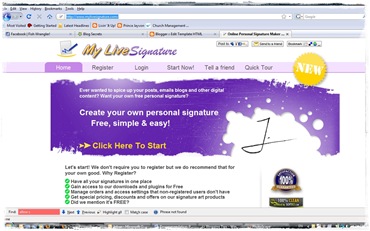
But I used another method. I went to My Live Signature, which has 120 fonts and allows you to “re-create” your signature! You can choose the size, the font, and even the “angle” of signature! Believe me, the options are so many that it boggled me for quite a while!

signature

Once you’re done selecting that “perfect” signature, you have two options.

a. You can click on “Want To Use This Signature?” and the website will give you the HTML code to insert into your blog.

b. Alternatively, you can also save the image into your computer, then upload onto Photobucket or a similar hosting website.

JPG vs PNG: Remember! If you have a non-white background to your blog, do remember to save the signature file with the .png extension. Else, a .jpg extension will also do for blogs with white backgrounds. Both Photoshop and Photobucket has the option for you to save the file as a “.png”.

After that, log on to your Blogger Account –> Dashboard –> Layout –> Edit HTML. Click on “Expand Widget Templates” and find this line:

<div class='post-footer-line post-footer-line-1'>

Paste this line of code just below:

<img src='the URL of your signature'>

And ta-da! You’re set! Preview it, and if you’re happy with how it looks, just press “Save Template”!


Phew… I think that should be enough for now. I’ve got a few more, but this is turning out to be a looooooooooooong blog post already! :) Hope it helps some of you out there.

If you have great tips on how I can improve my blog, do leave me a comment and tell me all about it!

Saturday, March 22, 2008

Finally!

After numerous attempts to upload videos on Youtube, I'm happy to announce I've finally managed to do so!

Thanks Mel - for always being such a GREAT sport! And lest you think we're such mean friends... check out Mel's SMILING face. Hahaha...

Oh... and a special thanks to Ed for his blog on using Windows Live Writer - which I'm also using to do up this blog entry. It is so much more user-friendly!